Engineer Moving Creations
Add mechanical building pieces and an external motor to transform VinciBot into moving structures, creative machines, and new robotic designs.

Code with MatataCode, starting with drag-and-drop programming and progressing to Python as skills grow. VinciBot’s sensors, lights, sounds, drawing, and precise movement bring every program into the real world.
Connect building parts, motors, and optional expansion kits to create machines, interactive projects, and AI-powered challenges that keep evolving with every new idea.
Connect VinciBot to MatataCode on a tablet or computer, then choose visual block coding or Python.
Drag coding blocks or write code to control movement, lights, sounds, drawing, and sensor responses.
Send the program to VinciBot and watch it move, react, draw, and perform in the real world.
Review the result, adjust the code, and keep experimenting until the project works exactly as planned.
Program routes, turns, and speed in MatataCode, then watch VinciBot carry each command into the real world.
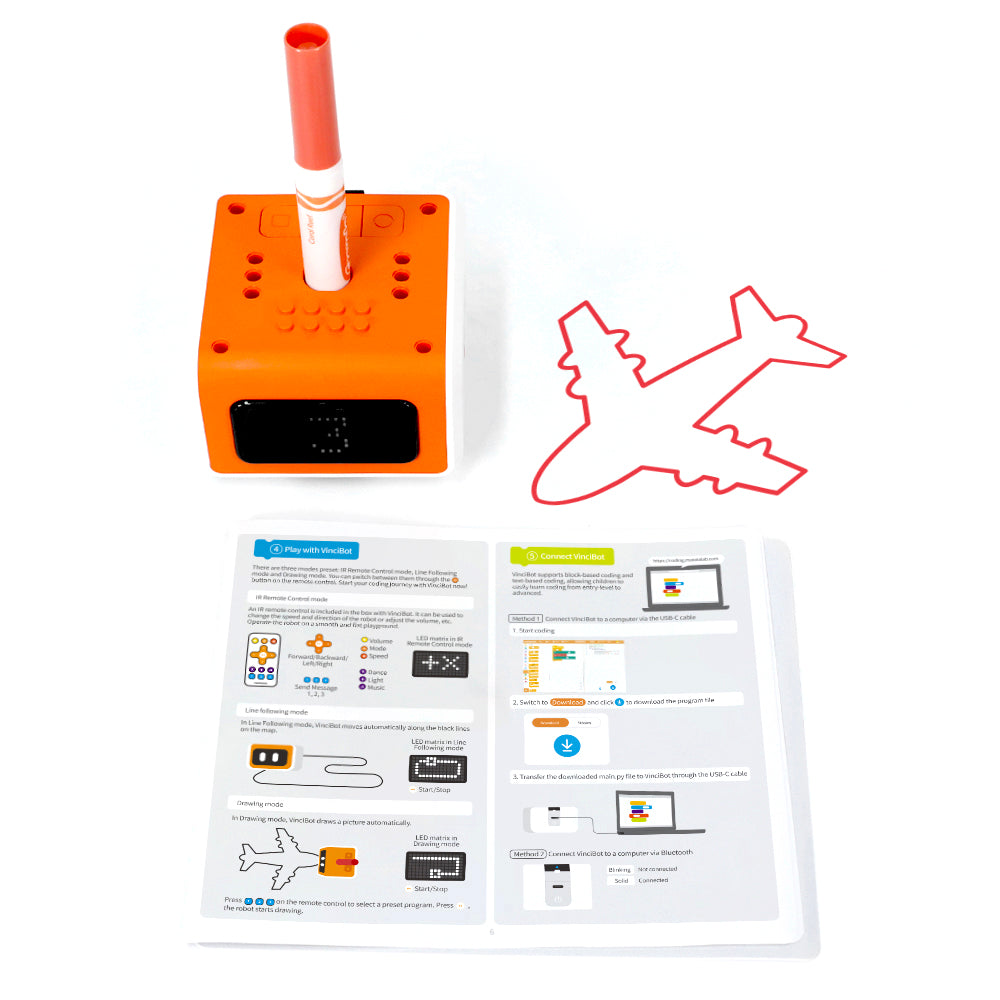
Attach the washable marker and code VinciBot to draw geometric shapes, repeating patterns, and original designs.
Combine 8 built-in sensors—including distance, color, light, sound, infrared, and line-following inputs—to build programs that react to their surroundings.
Use 21 instrument sounds to create melodies, then add programmable top lights and 16×8 LED animations for more expressive performances.
Connect VinciBot with LEGO® bricks, Technic motors, third-party electronic modules, or even other VinciBots to create larger machines and more advanced projects.
MatataCode helps children progress from drag-and-drop blocks to Python, connecting visual programming with real text-based code.
Loops, variables, conditions, and sensor inputs help children break down problems, organize logic, and build complete programs.
Compatibility with building blocks, motors, and electronic modules combines coding with hands-on construction and mechanical design.
Real-world testing helps children identify bugs, adjust their code, improve their designs, and try again.
Precise movement, drawing, music, lights, and the LED matrix turn code into artwork, animations, and interactive performances.
TinyML and sensor-based projects introduce how intelligent systems collect information, recognize patterns, and respond to their environment.
Children can start with visual block coding and progress to Python, so they can keep using the same robot instead of quickly outgrowing it.
Coding, drawing, music, lights, sensors, and creative construction offer many different project directions without relying on repetitive route-based play.
Optional kits and compatibility with building parts and electronic modules let families add new challenges gradually instead of replacing the entire system.
VinciBot supports coding, engineering, art, AI, and project-based learning, reducing the need to prepare separate tools for different STEAM activities.
Visual programming and Python allow the same platform to support beginners, experienced learners, and more advanced classroom projects.
Built-in sensors, lights, sound, drawing functions, and expansion support give teachers more lesson possibilities without managing multiple disconnected devices.
| Product Name | VinciBot | ||
|---|---|---|---|
| Recommended Age | Age 8+ | ||
| Product Size | 90 * 88 * 59 mm | ||
| Product Weight | 240g | ||
| Product Dimensions | 10 x 14 x 4.4 inches | ||
| Charging Time | 2hours, via 5V/2A adaptor | ||
| Single-charge Run Time | >=4hours | ||
| Motor Service Life | Up to 3,000hrs | ||
| Battery Capacity | 1500mAH | ||
| LED Light Matrix | 128 white LEDs | ||
| Player | Speaker (supports formats such as wav,mp3, etc.) |
Package Box
VinciBot x1
IR remote control x1
Challenge booklet x1 (18 activities )
Washable marker x1
USB-C cable x1
User guide x1
Double-sided map x1( blank map / line following map )
VinciBot is built to grow with every idea. Add optional Creator, Inventor, and AI Vision Kits to explore mechanical builds, programmable electronics, and visual AI—opening up even more ways to design, experiment, and create.
Add mechanical building pieces and an external motor to transform VinciBot into moving structures, creative machines, and new robotic designs.
Connect programmable sensors and electronic modules to build responsive experiments, interactive games, and original electronic projects.
Add vision technology to create projects that can capture images, recognise visual information, and respond through code.
Support coding stations, group projects, robotics challenges, and progressive STEAM lessons with a classroom-ready set designed for teachers and repeated use.
| Compare | ||||
|---|---|---|---|---|
| Recommended Age | Ages 8+ | Ages 3+ | Ages 5+ | Ages 12+ |
| Best For | Programming and STEAM progression | First coding and storytelling | Screen-free coding foundations | AI and advanced robotics |
| Screen Use | Computer or tablet-based | X | X | Device-based AI programming |
| Power Source | - | - | - | - |
| Expansion Options | Creator Kit, Inventor Kit, AI Vision Kit | Activity Box & TaleMap | Sensor & Animation add-ons | X |